
JetX download & install
How to Download and Play JetX on Any Device
Looking to download JetX? The honest version: there is no official standalone JetX app from SmartSoft Gaming. JetX is a browser HTML5 game that runs inside any modern casino. This guide shows the safe route on Android, iPhone, iPad, Windows, Mac and Smart TV — and the fake "JetX downloads" you should never install.
Try the JetX demo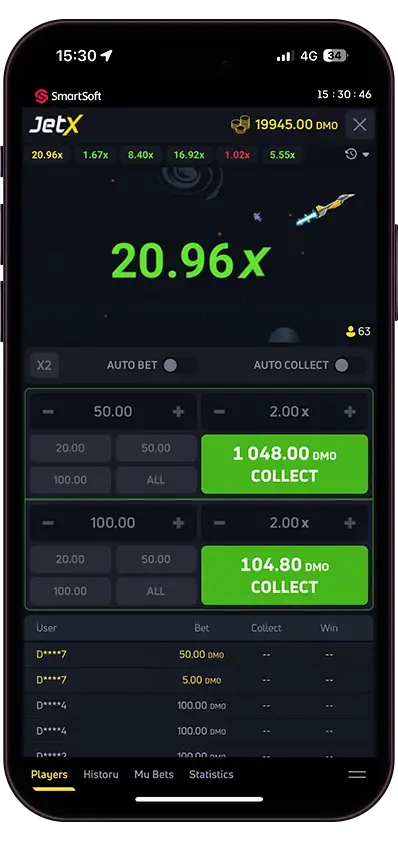
Direct answer
Is there an official JetX app to download?
No. SmartSoft Gaming does not publish a standalone JetX app on Google Play, the App Store or anywhere else. The "JetX downloads" you find online are either casino apps that bundle JetX in their lobby (1win, Pin-Up, Mostbet, etc.) or third-party APKs to avoid. The browser version is the official, safest way to play.
| Device | Best route | Real download needed? |
|---|---|---|
| Android phone | Casino app from operator's site, or play in Chrome | Casino .apk only — never a JetX-only file |
| iPhone | App Store casino app where listed, otherwise Safari | Only if the casino app is on the App Store |
| iPad | Same as iPhone, with extra screen room | Optional — browser is enough |
| Android tablet | Same as Android phone | Optional — browser is enough |
| Windows PC | Browser play (Chrome, Edge, Firefox) | No |
| Mac | Browser play (Safari or Chrome) | No |
| Smart TV | Built-in browser if available, or screen mirror | No native app exists |
Android
How to play JetX on Android
Most "JetX APK" downloads in search results are not the game itself — they are casino apps that include JetX, or unofficial files you should avoid. Google Play does not host real-money casino apps in most countries, so anything claiming to be "JetX by SmartSoft" inside the Play Store is suspect.
- Open your casino's official site in Chrome on the phone — not a search-engine cache or a shortened link.
- If the operator offers an Android app, download the .apk only from their domain (look for HTTPS and the licence footer).
- Enable "Install unknown apps" for Chrome just for that one install, then disable it again.
- Open the app, log in, and find JetX in the lobby — usually under "Crash" or "Instant".
- Prefer playing in Chrome itself if you do not want a casino app on your phone — JetX runs full-screen with no install at all.
Storage: 0 MB if you stick to the browser, roughly 30 to 80 MB if you install the casino's own Android app. Stable 4G or Wi-Fi is more important than the device model.
iPhone (iOS)
How to play JetX on iPhone
iOS is the simplest path. A handful of regulated casinos publish their apps on the App Store, but for most UK players the cleanest route is Safari plus "Add to Home Screen" — you get an app-style icon without sideloading anything.
- Open Safari and go to your casino's official site, log in to your account.
- Open JetX from the lobby. The game runs full-screen in the browser.
- Tap the Share icon, scroll down and pick Add to Home Screen.
- Tap Add. The icon now opens the casino directly with one tap, like a real app.
- If the casino has a real App Store app, install it from there — never trust an iOS configuration profile that promises to unlock JetX.
Storage: 0 MB for browser play, 80 to 150 MB if you install a real casino app from the App Store. iOS 13 or newer is the practical minimum.
Tablet
How to play JetX on iPad and Android tablets
Tablets are arguably the best JetX surface — bigger screen for the multiplier curve, more thumb room for two-bet setups, and the same routes as phones with no extra steps.
- Use Safari (iPad) or Chrome (Android tablet) and open the casino site.
- Pin the lobby to the home screen using Add to Home Screen / Install app.
- Hold the tablet in landscape mode — JetX's controls line up better there.
- Set auto cashout before each round to avoid hesitation on a touchscreen.
Older iPads on iOS 12 or below sometimes drop frames during fast rounds. If you see lag, close other tabs and disable Low Power Mode before playing.
Windows
How to play JetX on Windows PC
There is no Windows installer for JetX. Anything that asks you to download "JetX.exe" or a setup wizard is not the game. The browser is the official client.
- Use Chrome 100+, Edge 100+ or Firefox latest — JetX needs WebGL and HTML5.
- Log in to your casino in the browser and open JetX from the lobby.
- Right-click the casino tab and pick Pin tab so it stays put across sessions.
- Optional: in Chrome, open the three-dot menu, then More tools, then Create shortcut — JetX gets its own icon on the desktop.
Windows 10 or newer is the safe baseline. Hardware barely matters: any laptop from the last six years runs JetX comfortably.
macOS
How to play JetX on Mac
Mac players have the same path as Windows — no installer, just a modern browser. Both Safari and Chrome handle JetX smoothly.
- Open Safari or Chrome and sign in to your casino.
- Launch JetX from the lobby. Use the browser's Pin Tab option to keep it ready.
- On Safari, File → Add to Dock creates a Mac-app-style launcher for the casino.
- Avoid any .dmg or .pkg file that claims to install JetX — there is no such thing.
macOS 11 Big Sur or newer is recommended. Apple Silicon and Intel Macs both run the game without performance issues.
Smart TV
Can you play JetX on Smart TV?
There is no native JetX app for Samsung Tizen, LG webOS, Android TV or Apple TV. The game was not designed for a 10-foot UI or a TV remote, but two workarounds get the picture on screen if you really want it.
- Screen mirror from another device: AirPlay from iPhone or Mac to Apple TV, Chromecast from Android or Chrome on PC, Miracast on most Windows setups.
- Use the TV's built-in browser if it supports HTML5 — Tizen 4+ on Samsung and webOS 5+ on LG sometimes work, but the cashout button can be slow to react with a remote.
- Stick to auto cashout. Manual exits are a bad idea on a TV remote.
- Treat the TV as a passive screen and keep your real controls on your phone or laptop.
Reality check: TV is a novelty for crash games. The fast rounds and the manual cashout button do not pair well with remotes, so this is fine as a side experiment, not a primary device.
PWA / Home Screen
Add to Home Screen — the closest thing to a JetX app
If you really want a one-tap "JetX app" icon without sideloading anything, modern browsers let you create one. It is a Progressive Web App shortcut, opens full-screen, and uses the same login as your casino.
- iPhone / iPad: open the casino in Safari, tap Share, then Add to Home Screen.
- Android: open the casino in Chrome, tap the three-dot menu, then Install app or Add to Home Screen.
- Windows or Mac: in Chrome, click the install icon in the address bar (a small computer with a down arrow), or use the menu's Install option.
- Launch the icon — full-screen, no browser chrome, behaves like a native app.
Nothing is downloaded to your storage and no permissions are granted beyond a normal website. This is the safest install pattern there is.
Avoid these downloads
How to spot a fake JetX download
Most "JetX APK" pages in search are at best lazy aggregators and at worst malware vectors. The patterns repeat — once you know them, you spot fakes in seconds.
- The installer asks for accessibility permissions, SMS access or banking-app overlays — those let malware capture OTPs.
- It demands payment to "unlock the full JetX" or to activate a "premium predictor".
- The download link comes from Telegram, WhatsApp, an email attachment or a forum post.
- The site promises a built-in predictor, auto-win or "guaranteed multiplier" — all impossible in a provably fair game.
- There is no licence info, owner details, or contact page on the source site.
- The APK is suspiciously small (under 5 MB) or oddly large (over 200 MB) compared to a real casino app.
- Reviews on the source page are dated within the last 48 hours and read like template copy.
| Device | Minimum OS | Storage | Browser / engine |
|---|---|---|---|
| Android phone or tablet | Android 7.0 | 0 MB browser / 30-80 MB casino app | Chrome 100+ or Samsung Internet |
| iPhone or iPad | iOS / iPadOS 13 | 0 MB browser / 80-150 MB casino app | Safari 14+ or Chrome iOS |
| Windows PC | Windows 10 | 0 MB | Chrome 100+, Edge 100+, Firefox latest |
| Mac | macOS 11 Big Sur | 0 MB | Safari 14+, Chrome |
| Samsung Smart TV | Tizen 4+ | n/a | Built-in browser (limited) |
| LG Smart TV | webOS 5+ | n/a | Built-in browser (limited) |
| Apple TV / Android TV | tvOS 14 / Android TV 10 | n/a | Mirroring only — no native browser game support |
Frequently Asked Questions
Is there an official JetX app to download?
No. SmartSoft Gaming has not released a standalone JetX app for Android, iOS or any other platform. The game runs in the browser inside a casino lobby, which is the official, safest way to play.
Can I download JetX from Google Play?
No. Google Play does not host real-money gambling apps in most countries, including the UK. Any "JetX" listing on the Play Store is a third-party clone or a casino app that includes the game — not an official SmartSoft app.
Are JetX APKs on Softonic or APKPure safe?
Treat them with caution. Even when the file itself is clean, the version is rarely current, and there is no way to verify it was signed by the casino it claims to come from. The safest path is the operator's own website.
Do I need to download anything to play JetX on PC?
No. JetX is a browser game. Any modern Chrome, Edge, Firefox or Safari runs it directly — no installer, no plugin, no separate launcher.
Can I install JetX on a Smart TV?
There is no native Smart TV app. Some Samsung Tizen and LG webOS browsers can load the casino site, but the experience is poor with a remote. Screen mirroring from a phone or laptop is the practical workaround.
Is JetX free to download?
Browser play is free — including the demo mode. Real-money play requires a casino account and a deposit. There is never a fee for the game itself; if a "download" asks you to pay, it is fake.
How much storage does the casino app for JetX need?
Most casino apps that include JetX sit between 30 and 80 MB on Android and 80 to 150 MB on iOS. The browser version uses essentially no storage.
Can I play JetX offline?
No. Every round is generated live on the server using a provably fair seed, so an internet connection is mandatory. Offline JetX downloads do not exist.
Is there a JetX predictor app worth downloading?
No. Predictor apps cannot forecast a provably fair crash game. Most "JetX predictor" downloads are scams — some are wallpapers with animated numbers, some are credential thieves. Save the install.
What is the safest way to download JetX on Android?
Skip the standalone APK route entirely. Either play in Chrome with Add to Home Screen, or install the casino's own Android app directly from their official site after enabling unknown sources for that one install only.